
Before deploying a support Agent, decide what it may answer, who maintains its information, and what a visitor should expect when asking for a person. Then use a scenario-based acceptance matrix to check that the answers, handover route, and staffing plan agree. A request for assistance is not itself a staffed response.
Start with the service you can actually provide
Write down the support tasks you want the Agent to handle and the help your team can provide. Keep the first boundary concrete. For example, an illustrative online shop might allow answers about the published returns window but require a person to review requests for exceptions. This is a planning scenario, not a customer story or measured result.
For each task, choose one of three outcomes:
- Agent answers: The approved material contains the answer, and the response does not require an individual decision.
- Route to a person: A team member must interpret the case, approve an exception, or take another action your Agent is not authorized to take.
- Explain the limit: The approved material does not settle the question, or the support team cannot take the requested action. Say what the visitor can do next without implying that someone is already handling the issue.
Write the boundary in language a visitor could understand. “Help with returns” leaves room for assumptions. “Explain the published return window; do not approve exceptions” gives reviewers a rule they can apply. As general advice, treat consequential decisions and account-specific requests as person-required unless your business has approved a clear alternative process.
Distinguish a request from a staffed response
Choose what “ask for help” means in your operation. It might submit a request for a team member to review, or it might direct the visitor to another contact method. State the actual next step and any limits on availability. Do not promise a response time unless your team has set and can meet that commitment.
Authorized Workspace members can take over a conversation and reply as a human. Waiting or human-takeover conversations do not receive an AI response from the widget. Human handover is a route for help, not a response-time guarantee.
Turn that distinction into a staffing plan. Name who monitors incoming requests, when monitoring happens, who covers an absence, and what the visitor should do outside those hours. If no one is scheduled to monitor requests at a particular time, the visitor-facing wording should not suggest a staffed reply is available then.
For setup details, see the human handover feature and the handover setup guide. Use them to inform your plan, not as a substitute for deciding who in your business is responsible for requests.
Give knowledge a responsible owner
Name a person who approves support information and a backup who can handle changes when that person is unavailable. For each source, write down its owner, the policy or topic it covers, what event should trigger a review, and a question that would test it. A simple register might look like this:
| Topic | Source owner | Review trigger | Test question |
|---|---|---|---|
| Returns | Support lead | Policy changes | “How long do I have to return an item?” |
| Delivery | Operations owner | Delivery terms change | “What delivery window does the policy state?” |
| Exceptions | Business owner | Approval rules change | “Can you make an exception in my case?” |
This register is an operational worksheet, not a product feature. Its purpose is to make responsibility visible and give reviewers a reference for checking answers.
Knowledge sources, the Agent name, booking links, notification recipients and model-context personality traits, response style or language are live settings and take effect immediately. A source must finish processing before its content can be used in answers; attaching a file alone is not proof of indexing. Make source readiness a deployment check: confirm processing has finished, then compare a representative answer with the approved source.
Set a release gate for changes
Owners can ask the Architect to change Agent instructions, appearance and workflow in conversation. Those changes remain drafts until the owner publishes them.
Be precise about tone and personality: wording in draft instructions waits for Publish, while model-context personality traits, response style and language are live immediately. A tone request can change either kind of field, so check the saved field before assuming customers cannot see a change.
As general advice, record the field changed, who reviewed it, the intended behavior, and which acceptance scenarios need to be rerun. Before publishing a draft change, check its relevant scenarios. For a live setting, include a check of the saved value in your change procedure rather than treating it as a draft awaiting publication.
Use a scenario-based acceptance matrix
Before trying each scenario, write down the expected answer or action. Adapt this illustrative matrix to your own policy and staffing; the examples are not observed results. A pass means the response and next step match your defined service, not simply that the Agent replied.
| Scenario | Expected behavior | Pass condition |
|---|---|---|
| A visitor asks about a standard policy covered by approved material | Give the relevant policy information without adding an unapproved promise | The key detail matches the current source, and the answer adds no unsupported commitment |
| A visitor asks for an exception | Explain the limit and offer the approved route for review | The Agent does not approve or promise an exception on the team’s behalf |
| A visitor asks a question the approved material does not answer | Make the information gap clear and offer the next step you chose | The answer does not present a guess as policy |
| A visitor asks for a person during scheduled coverage | Follow the handover route and explain what happens next | A named role is responsible for monitoring the request, and the message avoids an uncommitted response-time promise |
| A visitor asks for a person outside scheduled coverage | State the actual availability and give the chosen alternative | The wording does not imply that a person is monitoring or will reply by an uncommitted deadline |
| A newly attached source is still processing | Do not treat its contents as ready for answers | The owner waits for processing to finish and checks an answer against the source before relying on it |
Keep a record of the test question, expected outcome, observed response, pass or fail, and owner for any correction. If a test fails, identify whether the gap is in the source, boundary, visitor-facing wording, workflow, or staffing plan. This makes the correction specific instead of prompting a broad rewrite without a clear reason.
For questions about what to test when information is missing, use the missing-knowledge test guide. For a separate way to review conversations after launch, see how to review Agent conversations.
Roll out with a review loop
Treat launch as a decision gate, not the finish line. Before widening the Agent’s scope, check that each high-priority scenario passes, a knowledge owner is named, the handover route has a monitor, and visitor wording matches actual coverage. Choose an initial scope your team can review and support; the right scope depends on your policies and staffing.
After launch, review conversations that the team marks unresolved or that concern a boundary, handover, or source gap. Compare answers with approved material and check whether the promised next step was available. Record the issue, its owner, and the date to review the correction. When you change a source, instruction, workflow, or staffing arrangement, rerun the affected scenarios.
A useful deployment review asks one practical question: does the Agent’s behavior match the support service we have chosen to provide? If not, identify whether the mismatch is knowledge, instructions, workflow, or coverage, then fix that part and check it again. This keeps customer-facing expectations aligned with the people and information responsible for supporting them.
Configure a public support topic first
In the selected Agent's Studio, request: “Answer setup questions from the approved help document. If the answer needs a private account record or is absent from the document, offer our support route.” Review the saved instructions, then inspect the workflow branch for a person.
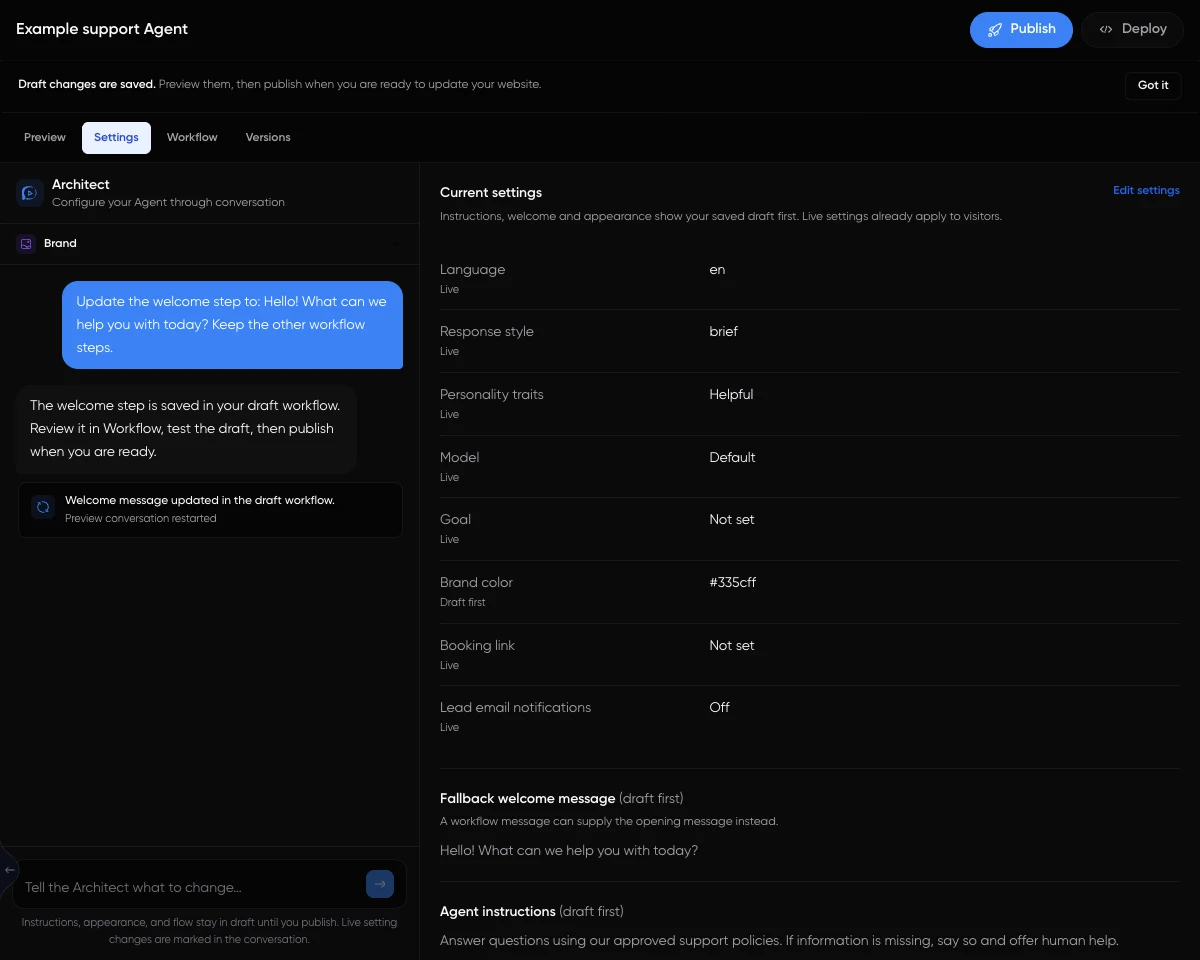
This is the actual Settings interface with illustrative content. Source readiness and operator coverage still need their own checks. Follow the support Agent setup example, then run the human handover drill. Use the AI-versus-live-chat comparison when deciding which requests should reach that branch.
For a public-information service with especially narrow boundaries, the healthcare administration example shows how to keep general enquiries separate from individual advice.