
Choose a no-code AI Agent builder by checking which exact changes can affect visitors immediately and which wait for publication. Then verify how you can inspect workflow edits, confirm when knowledge is ready, understand integration limits, and route conversations to a person. The outcome is a change-impact worksheet that records what you checked, what is live, and what still needs an answer before you choose.
“No-code” describes an approach to configuration, not whether every setting is easy to review or every business system is connected. Evaluate a specific visitor task and ask the vendor to demonstrate the controls that matter for it.
1. Start with a change-impact test
Pick one example task, such as explaining a service policy and directing a visitor to a person if the answer is not covered. List a few possible changes: edit an instruction, change the welcome wording, adjust a workflow step, and change a personality or language setting.
For each change, ask the vendor to show the exact field and answer three questions:
- Is the change saved as a draft, or does it take effect immediately?
- Where can an owner inspect the saved value and its status?
- What should the owner check before assuming visitors cannot see the change?
Do not rely on a general “draft” label as an answer for every setting. Tone and personality changes require a field-level check: wording in draft instructions waits for Publish, while model-context personality traits, response style and language are live immediately. Ask the vendor to identify the precise field and confirm its saved status for the change you intend to make.
With LoopReply, owners can ask the Architect to change Agent instructions, appearance and workflow in conversation. Those changes remain drafts until the owner publishes them.
In LoopReply, wording in draft instructions waits for Publish, while model-context personality traits, response style and language are live immediately.
Knowledge sources, the Agent name, booking links and notification recipients are also live settings in LoopReply and take effect immediately. Check the saved field before assuming customers cannot see a change.
Studio lets the owner inspect Settings, Workflow and Versions alongside the configuration conversation. Versions shows the stored draft and published states plus saved Architect changes, not restorable historical snapshots.
Use a worksheet row for each setting: field changed, draft or live, where you verified it, and any remaining question. If you cannot identify the field that controls a change, mark it unresolved. For general questions about configuration, start with the AI Agent builder information.
2. Check what a workflow preview tells you
A visual flow should make it possible for you to follow a visitor’s path: the opening, the questions, any branches, and where the conversation stops or goes to a person. Ask to see how the builder represents those steps and what happens to a preview after an edit.
Use a small worksheet for the path you want to evaluate:
| Step | Expected behavior | What to inspect |
|---|---|---|
| Opening | Introduce the help topic | Which setting supplies the opening text? |
| Question | Ask what the visitor needs | Did the edit affect the intended step? |
| Help route | Direct an uncovered request to a person | Is the route clear, and who monitors it? |
In LoopReply, the Architect can change the text or label of one existing workflow step without rebuilding the rest of the flow. Workflow changes restart the draft preview conversation.
Plan to check the draft preview again after a workflow edit. Also ask where the opening message comes from. The welcome text stored in appearance is a fallback; a workflow message can supply the opening message instead. Do not assume that changing the appearance welcome text controls every workflow’s first message.
When comparing tools, record whether you can inspect the individual step, what an edit changes, and what you must review again afterward. This is buyer advice, not a claim that every visual editor works the same way. A flow diagram is useful only if you can connect its labels to the conversation behavior you need.
3. Verify data readiness before judging answers
List the sources your example task depends on. Separate reference material, such as a service policy, from structured information, such as a spreadsheet of service areas. Ask how you can tell whether each source is ready and how you can compare an answer with the material it should use.
With LoopReply, attaching a file does not prove its contents have been indexed. A source must finish processing before its content can be used in answers.
A practical check is to choose one question that the source should answer and another it does not cover. Write down the expected answer or boundary before previewing the Agent, then compare the response with the source. A completed upload by itself is not proof that the content is ready or that an answer is correct.
If your use case depends on a database, ask whether information is synced for later use or looked up at the time of a visitor’s question. With LoopReply, the database connector supports PostgreSQL and MySQL with a validated read-only SELECT query. A synced knowledge dataset is not proof of a live database lookup for each visitor question.
Record the source, the evidence of readiness, and whether the task requires a live lookup. If a vendor cannot explain the distinction for your use case, leave that requirement open rather than treating “database support” as a complete answer.
For another practical checklist focused on evaluating answers from structured data, see four checks before your AI Agent answers from a spreadsheet.
4. Separate a website embed from an integration
Write down what visitors should be able to do, then name the information or business system each task requires. “Add chat to the website” is not the same requirement as “look up this visitor’s order” or “update a customer record.” Ask which connection supports the specific action, what permissions it needs, and what happens if it is unavailable.
For example, your worksheet might look like this:
| Visitor task | Information or action needed | Evidence to request |
|---|---|---|
| Ask about a service area | Current coverage information | Which source provides it, and is it ready? |
| Request an appointment | Booking details | Is this a link or a connected booking action? |
| Ask about an existing order | Order-specific information | Does the setup look up that order? |
With LoopReply, the website embed does not itself connect order data, a CRM, or other business systems.
Keep the website widget and each required integration as separate checklist items. Ask the vendor to show the connection needed for each task rather than inferring it from the fact that a chat window can appear on your site. If the task depends on personal or account-specific information, also ask what permission and identity checks apply; do not assume a connection grants every action.
5. Confirm permissions and the human route
Ask who can edit instructions, publish changes, manage sources, and reply to conversations. Then ask what happens when a person takes over: who is authorized, what the visitor sees while waiting, and who in your business is responsible for monitoring the route.
With LoopReply, authorized Workspace members can take over a conversation and reply as a human. Waiting or human-takeover conversations do not receive an AI response from the widget. Human handover is a route for help, not a response-time guarantee.
As practical advice, assign an owner for handovers and decide which kinds of questions should go to a person. Check that the route matches your actual availability. The presence of a handover option does not establish that someone will respond within a particular time. The human handover information can help you frame questions about who takes over and what happens next.
6. Complete the worksheet before choosing
Use one example task and mark each item “verified,” “unclear,” or “not supported.” Record the exact field, screen, or explanation you relied on; a general feature label does not resolve a practical question.
- Which instruction and workflow edits wait for Publish?
- Which settings, including personality or language, are live immediately?
- Where can I inspect the stored draft and published state, and what does the version view preserve?
- What message opens the conversation, and does an edit restart the preview?
- How can I confirm that a source has finished processing?
- Is the required information a synced dataset or a live lookup?
- Which business actions are actually connected, rather than merely described as integrations?
- Who can publish, who can take over, and who monitors a waiting conversation?
Choose after you can explain how the builder handles the rows that matter for your use case. Keep unresolved points in your decision notes, especially anything that could change what visitors see or determine whether your team can help them.
Make one visible change during the evaluation
Ask the configurator to replace a single workflow greeting while preserving the other steps. Open the resulting step, compare its text and connections, and inspect the difference between draft and published configuration.
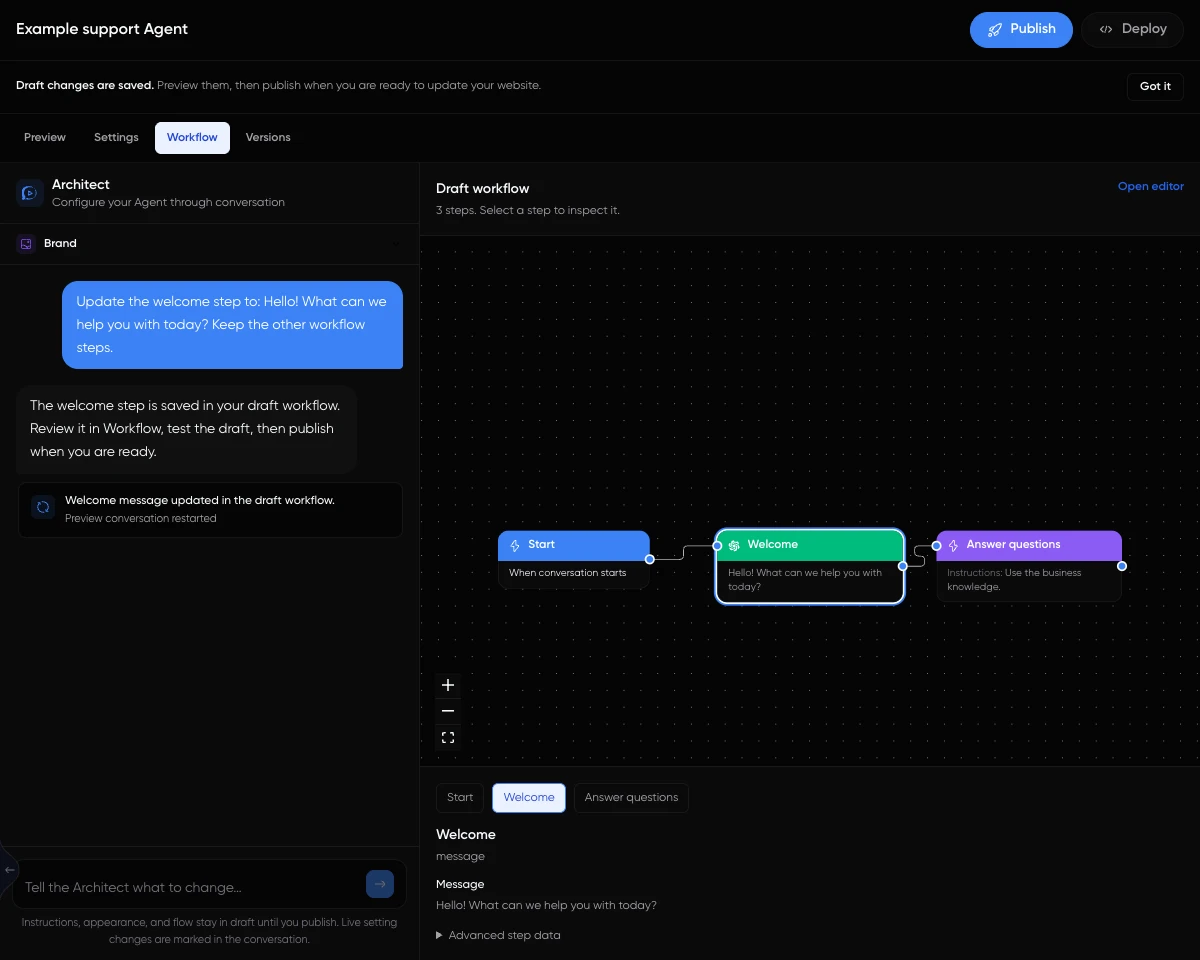
This LoopReply screenshot shows an actual selected message step with illustrative data. It documents what an owner can inspect, not a test of another vendor. Use the Studio review tutorial for the field-level checks and the no-code bakery build to complete a first Agent. The buyer guide keeps this maintenance task alongside cost and data requirements.